
logo
Menu
Dota 2
Dota 2
CyberSport News
Updated 2026-06-22
4822

How many wins does it take to rank up in Dota 2?

D
4 min read

Only winning Dota 2 matches will earn you MMR. In order to improve their total MMR, players must win more games than they lose. You could just be in the rank range that is most suited to your current Dota 2 skills if you feel trapped in a given MMR bracket in Dota 2. Dota 2 is a constantly changing game, thus learning more about it can help you win more games.

Dota 2 , Dota ranks , Dota ranked system , Dota news
Tweet Share on Facebook Copy link Send via Email
22 Bet

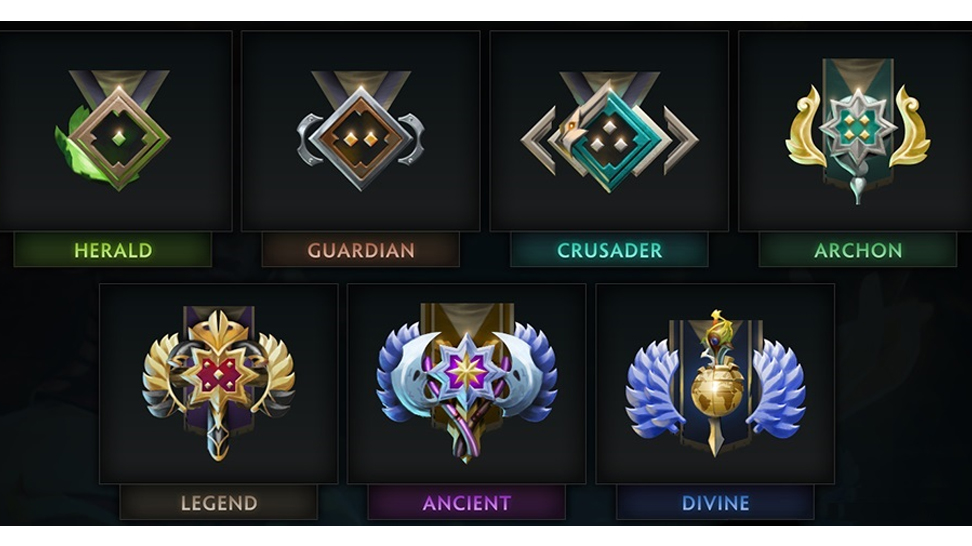
The 5th ranked season was the last in Dota. Now MMR is reset only at the request of the player. Once a year, we can activate the recalibration; after ten games, you will get a new rank. We have made an approximate table so that you always know how much MMR is needed for a new rank.


On average, it takes 150 points to reach a new star, which is essentially equivalent to five game wins. For a win without a party, they give 30 MMR, in a party - 20 MMR. The exact amount is charged for a loss. It will take 770 points to upgrade an MMR from a knight to a hero, just like a sovereign to a deity.
How many wins does it take to rank up in Dota 2?

Compared to the previous system, the number of points for ranks has not changed much on average:

  1. Herald - 50-70 MMR more for an up star;
  2. Guardian - 30-100 MMR more for an up star;
  3. Crusader - 50-100 MMR less for an up star;
  4. Archon – 20-220 MMR less for an up star;
  5. Legend - 200-320 MMR less for an up star;
  6. Ancient - 260-400 MMR less for an up star;
  7. Divine - 180-500 MMR less for an up star.
     

If you want to boost your rank you have to follow the next tips:

  1. Try not to play every hero. Instead, become good at a few of them;
  2. To spot places where you can improve, review both professional matches and your personal replays;
  3. Keep a cheerful attitude and try not to lose it. If you're upset, refrain from starting a new game queue;
  4. Keep the lines of communication open throughout a game with your teammates;
  5. Think about consulting a coach. If you're having trouble seeing your own gaming errors, maybe a second pair of eyes might shed some light on the situation.


The border will change depending on the world averages: now if you go down more than one star from the current rank, your medal will change. Valve is also at war with abusers: every player in a party that includes a Divine and Immortal rank player will be matched equally to the highest rank in that party. 


Earlier, Dataminers found references to new items in Dota 2 files that may be added to the game with the next update. On the DOTA_DM Telegram channel, a piece of the list of changes to the test client has been shared.

Tweet Share on Facebook Copy link Send via Email
D

More articles

Best CS2 Video Settings
Finding the best CS2 settings can improve your gameplay experience and, in turn, lead you to win more games. However, there are numerous game settings to choose from, and not all players have the time to tinker with them one by one. I’ve taken the time to experiment with the different and find the best optimized ones, so you don’t have to. Here are my best CS2 video settings to help you increase your FPS and game quality.
January 09, 2025
CS2 Loadout System
CS2 Loadout System
January 02, 2025
Rainbet Bonus Guide: Promo Codes, Free Bets, Wagering Rules & VIP Rewards ([year])
Rainbet Bonus Guide: Promo Codes, Free Bets, Wagering Rules & VIP Rewards (2026)
June 12, 2026
What are the most popular games with CS2 skins?

Hey, CS2 fans! Are you curious about the hottest games featuring those cool Counter-Strike 2 skins? Here, we will explore the best ones to show off your CS2 skins. From crash to casino, here’s a run down for every gamer out there—let’s go!

April 10, 2025
How to Show FPS in CS2? Step-by-Step Guide
Most people who play CS2 do it for fun. They are ready to relax and unwind at the end of the day, enjoying some adventure and action in their favorite shooter game. However, more experienced players or players who want to go pro usually pay attention to their FPS, and they make the FPS visible on their screens. With frames per second on your screen, you are able to see actions much sooner, allowing you to have a quicker reaction. If you’re interested in doing the same to your game, perhaps you’re thinking about how to show FPS in CS2. Keep reading, and you’ll find out how to see this metric on your screen whenever you want.
November 08, 2024
How to Fix CS2 Packet Loss?
November 21, 2024
How to Show FPS in CS2? Step-by-Step Guide
November 08, 2024
How to Fix CS2 Packet Loss?
November 21, 2024