What Is the KeyDrop Daily Case?
The Daily Case is a recurring reward system designed to incentivize active users. Unlike standard cases that require gold or balance to open, these are free of charge, provided you meet certain account criteria.
- Frequency: Available once every 24 hours.
- Rewards: Typically includes low-tier skins, gold coins, or small amounts of site balance.
- Purpose: It functions as a loyalty mechanic. While the odds of hitting a high-value "knife" are slim, it provides a consistent way to build a small inventory or fuel "Upgrader" attempts.
How the Daily Case Works
The system is divided into different "tiers" based on your account level.
- 24-Hour Cooldown: Most cases operate on a rolling timer. Once opened, the countdown begins for your next available spin.
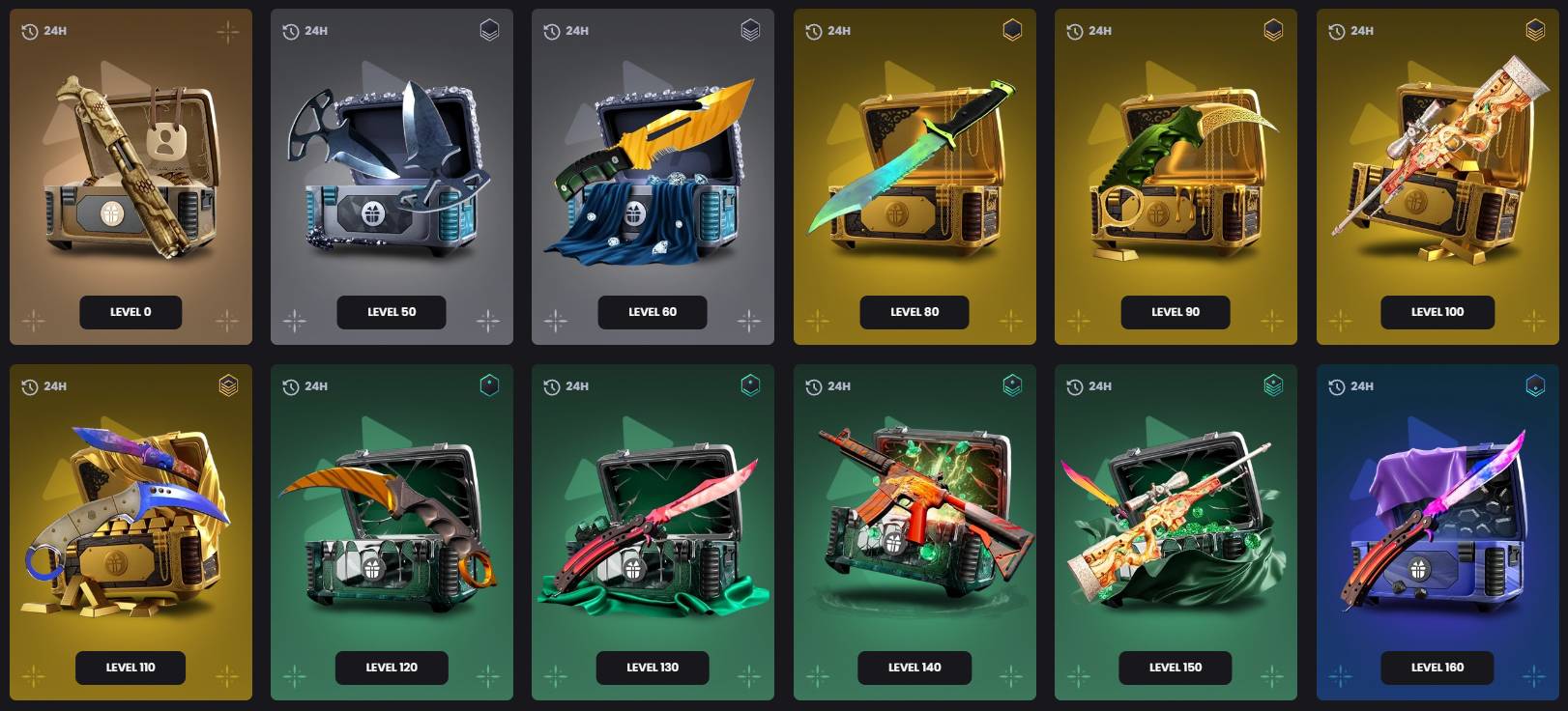
- Level-Based Access: You aren't limited to just one case if you are a high-level user. You can open the Daily Case for every level you have unlocked once per day.
- XP Progression: As you spend balance and participate in site activities, you gain XP. Higher XP levels unlock better Daily Cases with higher-value potential rewards.
Requirements to Unlock the Daily Case
To prevent botting and ensure fair play, KeyDrop has set specific entry requirements:
- Steam Integration: You must have a registered account linked to an active Steam profile.
- XP Threshold: To unlock the Level 1 Case, you generally need to reach Level 20 through site activity.
- The Avatar Shortcut: If you haven't reached Level 20 yet, you can often unlock the Level 1 Daily Case by setting your Steam avatar to a KeyDrop-branded image (provided on the site).
- Verification: Ensure your Steam profile is set to "Public" so the system can verify your avatar and level status.
Daily Case Levels (Level 1 and Higher)
The rewards scale with your dedication to the platform:
| Case Tier | Requirement | Reward Potential |
| Level 1 | XP Level 20 OR Avatar Change | Basic skins, minimal gold |
| Level 10-30 | Reaching specific XP milestones | Increased gold amounts |
| High Levels | Level 50, 70, 100+ | Rare skins and significant balance |
How to Claim Your Daily Case
- Log In: Authenticate via Steam on the official KeyDrop site.
- Navigate: Click on the "Daily Case" tab in the top navigation menu.
- Select Tier: Scroll to the highest level case you have unlocked.
- Open: Hover over the case and press "Open free daily case."
- Collect: The reward is automatically added to your KeyDrop inventory or balance.
Daily Reset Times
Understanding when you can open your next case is the most common point of confusion:
- Level 1 Case: This case typically resets at 00:00 UTC for everyone.
- Higher-Level Cases: These work on a rolling 24-hour timer as soon as you open them. A Level 10 case that is opened at 3:00 PM will be accessible again at 3:00 PM the next day.
Why Your Daily Case Might Be Missing
If the "Open" button is greyed out or the case isn't appearing, check these common issues:
- Insufficient XP: You may have dropped in rank or haven't reached the specific level for that tier.
- Avatar Sync Issue: If using the avatar method, the site may take 5–10 minutes to update. Try logging out and back in to force a refresh.
- Cooldown Active: Check if the 24-hour window has actually passed.
- Deposit Requirements: Some free cases require a minimum lifetime deposit to prevent "empty" accounts from farming rewards.
- Technical Conflicts: Adblockers or "Steam Inventory Helper" extensions can sometimes break the site's scripts.
Troubleshooting Daily Case Issues
- Refresh the Page: Simple, but effective for script errors.
- Clear Browser Cache: Old data can cause the timer to display incorrectly.
- Check Privacy Settings: Ensure your Steam profile and game details are public.
- Contact Support: If you meet all requirements and the case remains locked, use the on-site support ticket system.
Daily Case vs. Free Case vs. Promo Cases
Users often confuse these three distinct features:
- Daily Case: A permanent, level-based reward you get every day.
- Free Case: Usually refers to the "Free $0.50" or similar cases available to brand-new users using a referral code.
- Promo Case: Limited-time cases tied to seasonal events (like Christmas or Halloween) or partner giveaways.
Strategies to Maximize Daily Case Value
- Consistency is Key: Opening your cases daily adds up. Even small gold rewards can eventually be used to open a "King" or "Area 51" case for free.
- The Upgrade Path: Don't just sell low-tier skins. Use them in the KeyDrop Upgrader to try and turn a $0.05 skin into a $1.00 skin.
- Stack with Promo Codes: Always use a promo code when depositing to boost your XP faster, which in turn unlocks higher-tier Daily Cases.
- To level up faster and unlock better Daily Cases, use one of the latest KeyDrop promo codes before making a deposit to receive extra bonuses and XP rewards.
FAQs
How often can I open the Daily Case?
Once every 24 hours per unlocked level.
Why is my Level 1 case locked?
You likely haven't reached XP Level 20 or updated your Steam avatar to the required KeyDrop image.
How does the avatar-change unlock work?
Download the KeyDrop logo from the "Daily Case" section, set it as your Steam profile picture, and then click "Verify" or re-log into the site.
Are rewards withdrawable?
Yes, but you usually need to meet a minimum deposit requirement (standard across most CS skin sites) before you can withdraw items to your Steam inventory.
Can I lose access to Daily Cases?
Only if you change your avatar back (if that was your unlock method) or if your account is flagged for violating the terms of service.
Why is there a limit without a deposit?
This prevents "farming" accounts from draining the reward pool without contributing to the site's economy.







![KeyDrop Daily Case Guide - How to Unlock Your Free Case ([year])](/imgs/news_8549/20260128/1769592213_704b6fffed8bedabca2e.jpg)


![Strategies to win at CS Roulette (in [year])](/imgs/news_8180/20250401/cache/1743522679_36acde0fd50b381e0fee___308_174.jpg "Strategies to win at CS Roulette (in [year])")

![Is KeyDrop Legit? Safety, Fairness & Trust Guide ([year])](/imgs/news_8556/20260202/cache/1770023621_90c443e9af7941f3469b___308_174.jpg "Is KeyDrop Legit? Safety, Fairness & Trust Guide ([year])")