
logo
Menu
CS2
CS2
CyberSport News
Posted 2026-03-13
1198

G2 and Team Liquid Announce Player Swap: malbsMd for NertZ

Muhammad Shahrayar Sheikh is a news writer at cyber-sport.io who covers the latest news in the Counter-Strike 2 sphere. Amongst the many games he grew up playing, Counter-Strike 1.6 was...
4 min read

In a surprising move within the esports scene, G2 Esports and Team Liquid have officially announced a player exchange, swapping malbsMd for NertZ. This strategic change aims to enhance both teams' rosters ahead of the upcoming competitive season.

Contents
CS2
Tweet Share on Facebook Copy link Send via Email
CSGORoll Halloween event

Strategic Roster Changes in Top Esports Teams

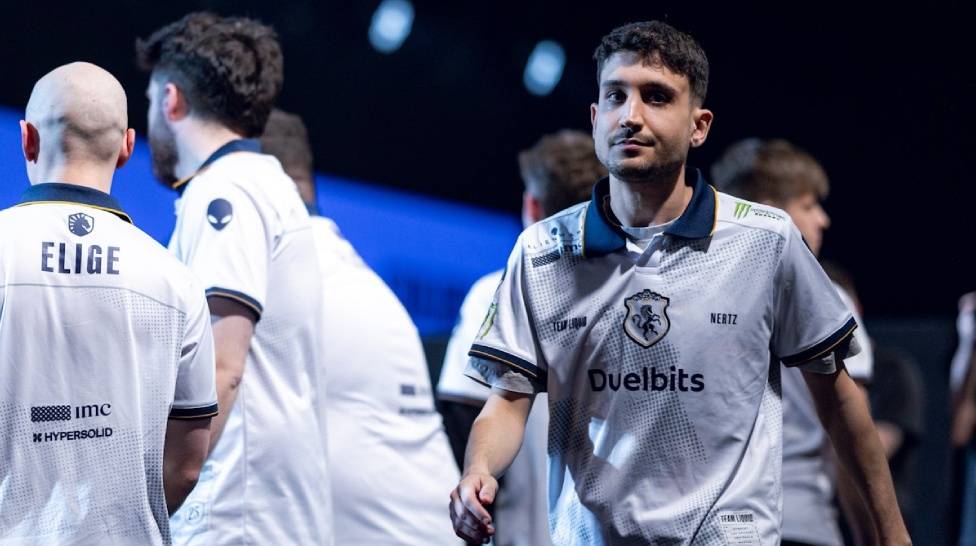
In an unexpected twist in the esports world, two of the most prominent organizations, G2 Esports and Team Liquid, have decided to exchange players in a bid to reinvigorate their line-ups. Malik "malbsMd" Smith will now be a part of Team Liquid's roster, while Nermin "NertZ" Zeković will take his talents to G2 Esports. The decision comes at a critical time as both teams look to optimize their performance for the challenges that lie ahead.

A New Chapter for malbsMd and NertZ

The swap between G2 and Liquid is not just a mere change of jerseys for these players but marks an important chapter in their careers. For malbsMd, joining Team Liquid represents an opportunity to bring fresh dynamics to an already robust team. Conversely, NertZ’s move to G2 offers him the chance to showcase his skills on a new platform and contribute towards achieving the team’s ambitious goals.

Team Perspectives on the Swap

Both teams have expressed optimism about the swap. In official statements released by G2 Esports and Team Liquid, they emphasized that this exchange aligns with their strategic plans for future competitions. These organizations are known for their meticulous approach to building capable rosters that can contend at the highest level of competition.
G2 and Team Liquid Announce Player Swap: malbsMd for NertZ

Expected Impact on Future Performances

This swap raises several questions regarding how these changes will influence both teams' performances in upcoming tournaments. Analysts are keenly observing how these players will adapt to new environments and teammates.

  • G2 Esports aims to integrate NertZ into its aggressive playstyle.
  • Team Liquid hopes malbsMd brings an innovative approach that complements its tactical strategies.

The success of this swap hinges on how quickly malbsMd and NertZ can adjust and synergize with their new teammates’ playstyle and strategies.

Fan Reactions Split Over Strategic Move

Fan reactions have been mixed regarding this high-profile player swap between two titans of the esports industry. Supporters are curious and somewhat speculative about how these changes will translate into success or failure during live matches. Whether this strategic maneuver pays off for G2 Esports and Team Liquid remains one of 2023's most intriguing questions within competitive gaming circles. 


This player exchange highlights the constant evolution happening within professional gaming organizations as they strive for excellence in increasingly competitive arenas. As both teams prepare themselves with these refreshed rosters, fans eagerly await seeing how these changes influence their favorite teams’ fortunes moving forward.

Tweet Share on Facebook Copy link Send via Email
Muhammad Shahrayar Sheikh

More articles

How to Show FPS in CS2? Step-by-Step Guide
Most people who play CS2 do it for fun. They are ready to relax and unwind at the end of the day, enjoying some adventure and action in their favorite shooter game. However, more experienced players or players who want to go pro usually pay attention to their FPS, and they make the FPS visible on their screens. With frames per second on your screen, you are able to see actions much sooner, allowing you to have a quicker reaction. If you’re interested in doing the same to your game, perhaps you’re thinking about how to show FPS in CS2. Keep reading, and you’ll find out how to see this metric on your screen whenever you want.
November 08, 2024
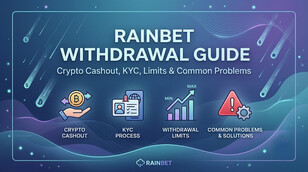
Rainbet Withdrawal Guide: Crypto Cashout, KYC, Limits & Common Problems ([year])
Rainbet Withdrawal Guide: Crypto Cashout, KYC, Limits & Common Problems (2026)
June 05, 2026
What are the most popular games with CS2 skins?
April 10, 2025
Best CS2 Video Settings
Finding the best CS2 settings can improve your gameplay experience and, in turn, lead you to win more games. However, there are numerous game settings to choose from, and not all players have the time to tinker with them one by one. I’ve taken the time to experiment with the different and find the best optimized ones, so you don’t have to. Here are my best CS2 video settings to help you increase your FPS and game quality.
January 09, 2025
Complete CS2 Console Commands Guide in 2026
CS2 console commands are a powerful tool that allows players to customize their gameplay, change settings, and even optimize performance using the developer console. Typing these commands in can allow for on-the-fly changes to server settings and can even provide access to hidden game settings. So today, we’re tackling the most popular CS2 console commands and how to use them.
February 21, 2025
How CSGORoll Works: Coins, Games, and Rewards Explained
June 03, 2025
Complete CS2 Console Commands Guide in [year]
Complete CS2 Console Commands Guide in 2026
February 21, 2025
How CSGORoll Works: Coins, Games, and Rewards Explained
June 03, 2025