Looking back at the team’s track record, fans have also pointed out how NAVI has finally broken some of their curses. For one, they finally beat Team Spirit in this tournament after losing to them four times in a row over past tournaments. The best part, however, was that their team captain Aleksi "Aleksib" Virolainen also broke a years-long streak of seven consecutive losses in best-of-five series.
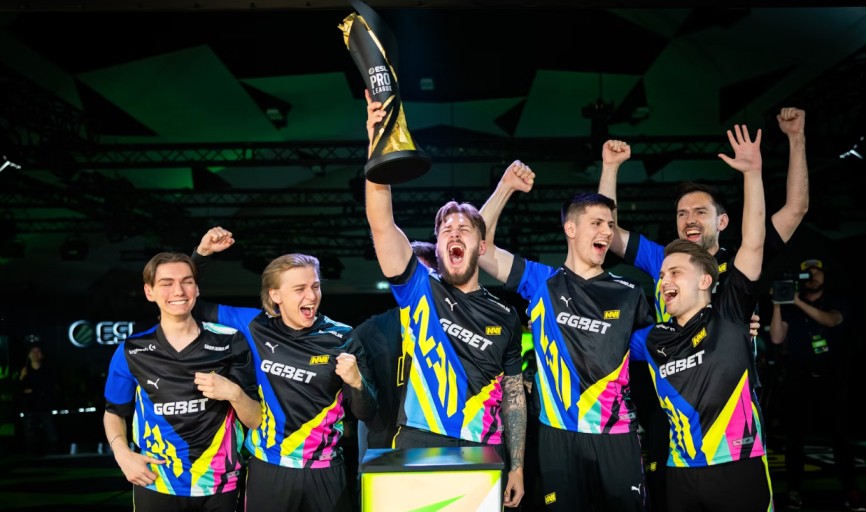
What did the players have to say?
If there was one player everyone wanted to interview after the grand final, it was the Lithuanian rifler, Justinas "jL" Lekavicius, the MVP. He really showed up this tournament, all the way up to the end, securing a 1.42 rating and playing a huge role in taking down giants like Team Spirit and G2 Esports. Some fans were not surprised by his performance as he was in peak form all year, particularly at PGL Major Copenhagen, where he also secured his career’s first MVP.
When asked about his feelings following the hard-earned victory, jL said: “It feels amazing. It was a tough fight, I for sure expected it to be a different game, but I don't think we showed up. But I don't think it's about us not showing up, I think Eternal Fire were super strong and really well prepared for the game. Their fans also showed up and supported them, they were super loud and I feel like it helped them a lot. Regardless, I'm still happy about the win.”
When asked about his MVP-worthy performances so far, he said: “I feel like it was an MVP-worthy performance until the grand final, but I don't know, something dropped, I really have to figure that out myself. I couldn't play under pressure, I felt like I was making a lot of mistakes, which is not typical of me. I don't know, I really have to figure this out. Besides that, I am super happy my team was there for me. They supported me and no matter what happened we kept pushing, and we pushed until the victory.”
Finally, jL was questioned on NAVI’s consistent track record of reaching the grand finals over the past four recent Majors and how it made them one of the best teams in the world, he said: “Yeah for sure, 100%. Four grand finals in a row, two wins, two losses. We're doing a good streak, win, loss, win, loss. So Fall Finals grand final we lose, then Rio we win, then Shanghai… wait no, that's bad. No no no, screw the streak, we are breaking the curse now!”

Knives are some of the most valuable items in CS2. They are a favorite option for anyone who plays the game regularly. While some use them merely as a cosmetic improvement to their weapons, others prefer to get them to create a valuable collection. Having the most expensive CS2 knife in your arsenal can give you a feeling of pride, especially knowing everyone will admire it and probably ask you if you’re thinking of selling it. But what is the most expensive knife in CS2? This post will reveal the priciest options, so let’s get started.




![Is KeyDrop Legit? Safety, Fairness & Trust Guide ([year])](/imgs/news_8556/20260202/cache/1770023621_90c443e9af7941f3469b___308_174.jpg "Is KeyDrop Legit? Safety, Fairness & Trust Guide ([year])")