


In a significant move within the competitive Counter-Strike: Global Offensive (CS:GO) scene, G2 Esports has officially announced the benching of Janusz "Snax" Pogorzelski from their active roster. The change comes as the team looks to revamp its lineup amidst fluctuating performances.

In an unexpected turn of events for fans and competitors alike, G2 Esports has decided to bench veteran player Janusz "Snax" Pogorzelski. This decision marks a pivotal moment in the team's strategy as they navigate through an ever-competitive landscape within CS:GO. Snax, known for his considerable skill and tactical prowess, had been a significant contributor to the team's successes and challenges alike.
The benching of Snax raises questions about the future direction of G2's roster and overall strategy within competitive CS:GO. Analysts speculate this could be the first of several moves aimed at revitalizing the team's performance on both a regional and global stage.
The decision to sideline such an experienced player suggests that G2 is ready to experiment with new talents or perhaps shift their in-game strategies more drastically.
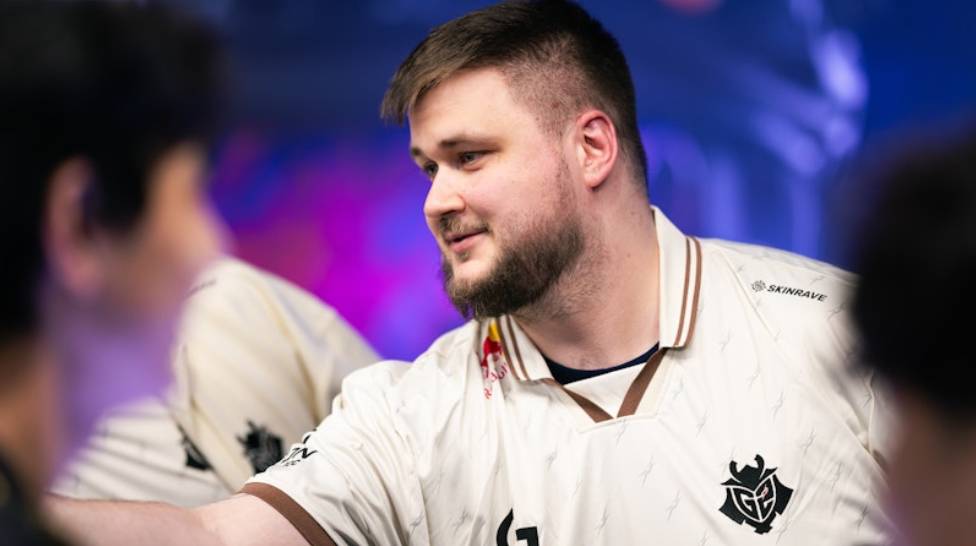
For Janusz "Snax" Pogorzelski, being moved to the bench is certainly a significant career moment. However, given his reputation and achievements in CS:GO over many years, he remains an attractive option for other top-tier teams looking to bolster their rosters. How quickly we see him return to active competition will be keenly watched by fans across the globe.
With Snax moving to a non-active role, speculation is rife about who might fill his shoes within G2 Espots' lineup. Candidates from both emerging talents and seasoned professionals are being considered as possible additions to help recapture some of the magic that has made G2 one of Europe’s premier CS:GO teams.
This adjustment period will also test the team dynamics profoundly as players adapt to new roles or new faces altogether. Success in this transitional phase will be critical if G2 aims to maintain its status among CS:GO’s elite.
In conclusion, while Snax's benching might come as a shock to many within the esports community, it signals G2’s commitment to shaking things up in pursuit of regaining their top form. Adding fresh talent or rethinking strategies thus becomes imperative for the team eager to reassert its dominance in the competitive arena of Counter-Strike: Global Offensive.

CS2 is home to thousands of fantastic skins, and we’re often faced with difficult decisions as to which skin is worth buying and which one is worth using. Skin inspect servers allow players to preview any skin, test animations, and see how they look in different lighting conditions. So, here’s how to access skin inspect servers and review skins before you make a purchase.




![How to Use Rainbet: Beginner Guide to Registration, Deposits & Betting ([year])](/imgs/news_8725/20260526/cache/1779781117_da86f07134d60bf56076___308_174.jpg "How to Use Rainbet: Beginner Guide to Registration, Deposits & Betting ([year])")
![How to play Rollbit in the USA? ([year])](/imgs/news_8213/20250620/cache/1750410177_39d04af8d6935ea4fc7c___308_174.jpg "How to play Rollbit in the USA? ([year])")
![Complete List of CS2 Viewmodel Commands – Optimize Your Setup in [year]](/imgs/news_8166/20250317/cache/1742228858_01423ecd06a0b619da09___308_174.jpg "Complete List of CS2 Viewmodel Commands – Optimize Your Setup in [year]")