Before that, the HLTV writers give numbers that show who the best players and teams are in different categories. HLTV revealed who had the most multikills in 2022, with well-known player s1mple ranking first.

HLTV have listed the top players according to the percentage of clutches they have won in a 1x1 matchup. The top-ranked esports player in 2022 was Brazilian KSCERATO, who concluded the year with a brilliant 77.3% and won 17 of 22 clutches. Moreover, Cloud9 AWPer sh1ro concluded the season with a score of 0.50.
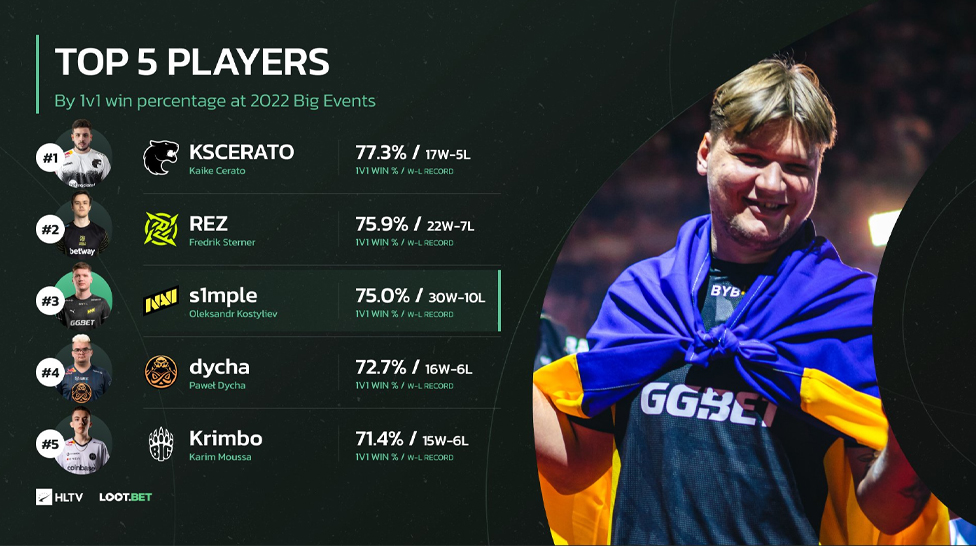
The second line has REZ. The Swedish player Ninjas in Pajamas finished the previous season with 75.9% after winning 22 1x1 clutches. S1mple, who played the most crucial circumstances out of all the esportsmen on the rating, took 3rd position. Ukrainian sharpshooter finished the season with a 75% winning percentage by taking 30 out of 40 clutches.
With 72.7% of clutches won in a 1x1 match, ENCE AWPer Dycha completed the year in fourth place, just missing the top spot (16 out of 22 clutches won). Krimbo completes the top five of HLTV rating. The German has won 15 out of 21 duels, and the young BIG player finished 2022-1 with a 71.4% rate.
Additionally, the rating's creators included the top players who played less than 20 clutches. Last season, HObbit and floppy, who each won 15 out of 17 duels, had the highest winning percentages. Another young person appeared on Xyp9x, who took 12 out of 14 clutches. Mention was made of YEKINDAR, who won 14 out of 18 duels and had a final score of 77.8% for the year.
Earlier, HLTV provided the top pistol shooters of 2022 in a different selection. Twistzz ended the season with a rating of 1.38 for 122 cards played, taking the lead in the rating. Twistzz broke ZywOo's three-year reign of terror, who rose to the top of the global rankings in the pistol rounds in 2019-2021.
Gamdom is an online crypto casino and betting site where you can play all sorts of casino games. Some versions of the platform also let you bet on sports or esports. Because it involves real money and crypto, a lot of people naturally want to know if it’s legit, who runs it, and whether they can even use it in their country.
It’s worth noting that Gamdom isn’t available everywhere. Before signing up or putting in any money, you should check your local laws and Gamdom’s own rules. And like with any gambling, there’s a real risk of losing money, so it’s best to think of it as entertainment, not a way to make cash.
CS2 is home to thousands of fantastic skins, and we’re often faced with difficult decisions as to which skin is worth buying and which one is worth using. Skin inspect servers allow players to preview any skin, test animations, and see how they look in different lighting conditions. So, here’s how to access skin inspect servers and review skins before you make a purchase.
Knives are some of the most valuable items in CS2. They are a favorite option for anyone who plays the game regularly. While some use them merely as a cosmetic improvement to their weapons, others prefer to get them to create a valuable collection. Having the most expensive CS2 knife in your arsenal can give you a feeling of pride, especially knowing everyone will admire it and probably ask you if you’re thinking of selling it. But what is the most expensive knife in CS2? This post will reveal the priciest options, so let’s get started.




![Top 5 CS2 Cheats in [year]](/imgs/news_8003/20241107/cache/1730975319_fad9f983f190c7d75fc0___308_174.jpg "Top 5 CS2 Cheats in [year]")